用 Denodo 和 Amazon Bedrock AgentCore 在 AWS 上为智能体 AI 构建语义层
Build a semantic layer for agentic AI on AWS with Denodo and Amazon Bedrock AgentCore
AWS 博客演示用 Denodo Platform 作为语义层、配合 Amazon Bedrock AgentCore 托管智能体,联邦查询 Amazon Aurora、Amazon Redshift 和本地 PostgreSQL 三处数据源。
Agentic AI applications need governed access to live enterprise data. That data can live in operational systems, analytical warehouses, SaaS applications, other clouds, or on premises. In the previous post in this series, we built a semantic layer on AWS using Stardog’s knowledge graph over Amazon Aurora and Amazon Redshift. A Strands agent on Amazon Bedrock AgentCore queried that layer. Amazon Bedrock AgentCore is a platform to build, connect, and optimize agents at scale, with any framework or model. This post uses the same customer 360 pattern, but swaps in a different semantic layer implementation and extends the source mix.
Two things change here. First, the semantic layer is the Denodo Platform: an AI data layer that provides active context and live, zero-copy access to distributed enterprise data. The agent talks to it in VQL, Denodo’s SQL dialect. Second, the source mix includes an on-premises PostgreSQL database alongside Amazon Aurora and Amazon Redshift, so the federation problem is no longer bounded by an Amazon Virtual Private Cloud (Amazon VPC).
The rest of the pattern carries over. A foundation model on Amazon Bedrock plans and writes queries. The Denodo MCP Server exposes governed views to the agent through the Model Context Protocol (MCP). Amazon Bedrock AgentCore hosts the agent, terminates inbound authentication, and manages the outbound credential the agent presents to Denodo. Everything the model reasons over lives inside the semantic layer rather than the prompt: the joins, the metric definitions, and the row and column filters that apply to the caller.
By the end of this post, you will know:
- How to federate Amazon Aurora, Amazon Redshift, and an on-premises PostgreSQL database in Denodo into a single customer 360 view an agent can query.
- How to expose that semantic view to an AgentCore-hosted agent through the Denodo MCP Server, and how to register the MCP Server as an AgentCore Gateway target.
- How the end user’s identity flows from the enterprise identity provider through AgentCore Identity On-Behalf-Of token exchange to Denodo.
- How Global Security Policies apply row and column filters at query time.
- The two deployment options for Denodo on AWS: Agora, the fully managed cloud service, and self-managed installation on Amazon Elastic Compute Cloud (Amazon EC2) or Amazon Elastic Kubernetes Service (Amazon EKS).
We assume you’re familiar with the semantic-layer architecture from the previous post: what it is, what it’s for, and why the model plans query without owning the joins. If any of that is new, the previous post covers the ground.
The example: Customer 360 with a source outside AWS
We stay with the same customer 360 pattern from the previous post. The Stardog C360 Knowledge Kit used in the previous article models an ecommerce retailer with two motivating use cases: understanding churn and identifying customers for auto-enrollment in a rewards program. The schema doesn’t change in this post. What changes is where one table lives: rewards_account sits on an on-premises PostgreSQL cluster rather than in Amazon Aurora with the rest of the customer profile data.
That placement isn’t a special case. Enterprise data sources might be outside AWS: on premises, in a SaaS tool like a CRM, or in another cloud. The semantic layer must reach whichever applies. We use on-premises PostgreSQL for the walkthrough that represents data from a third-party application. The Extending to other sources section covers what changes when the source is a SaaS tool, a CRM, or a mainframe. It also covers the other hundreds of data sources that Denodo supports by default.
Amazon Aurora (PostgreSQL-compatible): Customer profile
| Table | Key columns |
| customer | cid (PK), first_name, last_name, email, ssn, phone, location |
| address | id (PK), city, state, zip, street_name |
| credit_card | id (PK), cid, card_num, card_type |
Amazon Redshift: Order history
| Table | Key columns |
| order | id (PK), cid, pid, order_date, quantity, price, card |
| product | id (PK), name, brand, price, dept |
On-premises PostgreSQL: Rewards program
| Table | Key columns |
| rewards_account | id (PK), cid, account_id, create_date |
The shared identifier is cid, a plain integer that appears as the primary key in the Aurora customer table. It appears as a non-foreign-key column in the Amazon Redshift order table and the on-premises rewards_account. Within Aurora itself, the customer.location column is an integer foreign key to address.id, which is how the profile joins to the address record. There is no foreign key that spans two engines, and no ETL job to build one. Answers that join customers to their purchases and their rewards enrollment must reconcile cid at query time.
A representative question this setup answers: “Which of our top 20 customers by lifetime spend haven’t enrolled in the rewards program yet?” This is the auto-enrollment scenario from the Stardog kit, and it needs profile data from Aurora, lifetime spend from Amazon Redshift, and enrollment status from the on-premises cluster to answer.
Denodo plans the federated query at execution time, deciding what to push into Aurora, what to push into Amazon Redshift, what to fetch from the on-premises cluster, and how to combine the results. No data moves between sources, and the semantic layer stays declared once for every consumer to reuse.
Denodo terms used in this post
Denodo implements the semantic layer as a data virtualization platform. Denodo Virtual DataPort (VDP) is the query engine at the core: it’s where the semantic-layer objects live, where VQL executes, and where access policies evaluate. Design Studio is the browser-based authoring surface for VDP. Every object modeled in this post is defined there.
Three object types come up repeatedly.
- A base view is a mapping between a physical table, API, or file in a source system and a logical view in VDP. One Aurora table maps to one base view.
- A derived view is a VQL query over one or more base or other derived views. The
customer_360view in this post is a derived view. - A metric view defines a business measure once (for example,
lifetime_customer_value) and lets other derived views reference it. Metric views separate the definition of a measure from any specific query that uses it.
VQL is Denodo’s SQL dialect. It’s ANSI-aligned SQL plus a set of Denodo-specific constructs, notably DDL constructs to represent data sources and syntax for semantic metric views. In an agentic scenario, the specific syntax of VQL is provided by a skill that will be used by the LLM when using Denodo tools to facilitate correct use of Denodo’s syntax.
A Global Security Policy (GSP) is a runtime access-control rule that applies to views or columns carrying a specific tag. GSPs are how row filters and column masks get enforced at query time, evaluated per caller.
For a fuller reference, see the Denodo Platform documentation.
Reference architecture
The runtime has two flows. Inbound: A client sends the user’s request to the agent through Amazon Bedrock AgentCore Gateway. Gateway validates the JSON Web Token (JWT) that identifies the human user against the enterprise identity provider (IdP), then routes the request to Amazon Bedrock AgentCore runtime, which hosts the Strands agent process. The agent invokes a foundation model on Amazon Bedrock (Anthropic Claude Sonnet 4.6 in this walkthrough) to interpret the prompt and plan the query.
Outbound: AgentCore Gateway also acts as the outbound proxy for the agent’s tool calls. The Denodo MCP Server is registered as an MCP target on Gateway, so tool calls the agent makes for enterprise data route through Gateway to the MCP Server. Before the request reaches Denodo, AgentCore Identity performs an On-Behalf-Of token exchange, converting the human user’s inbound token into a scoped access token that represents the same user with Denodo as the audience. The Denodo MCP Server accepts the exchanged token as a bearer credential and forwards the VQL request to Denodo Virtual DataPort (VDP) over JDBC. VDP validates the token independently, resolves the caller to a Denodo role, applies access policies, and plans the federated query against Amazon Aurora, Amazon Redshift, and the on-premises PostgreSQL cluster.
Only the VQL request travels down to VDP and the result set travels back up. No source data moves between engines. Aurora, Amazon Redshift, and the on-premises cluster respond to native SQL rewritten by VDP’s federated optimizer. The following sections cover the identity propagation and policy enforcement in detail. Additional sections cover the MCP Server registration and agent deployment steps.
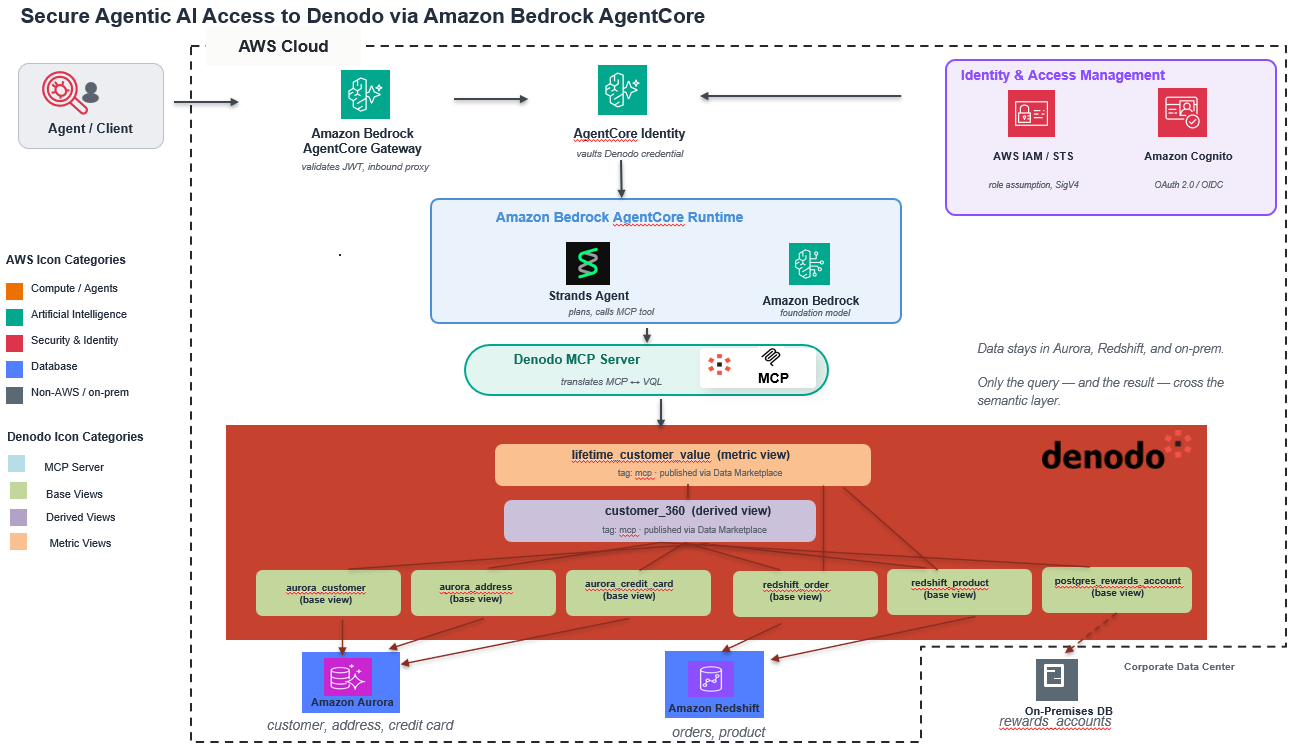
Figure 1: Inbound authentication path and outbound query path between the caller, Amazon Bedrock AgentCore components, the Denodo MCP Server, Denodo Virtual DataPort, and the three data sources
Build the semantic layer
The semantic model in Denodo is not a single artifact. It’s a collection of base views, derived views, metric views, and tags in VDP that together present business-meaningful data to consumers. Building the semantic model in this post means creating each of those pieces.
We build in three passes: base views over each source table, a derived view (customer_360) that joins the base views on cid at the customer level, and a metric view (lifetime_customer_value) that defines a reusable spend aggregation queries can join in when they need it.
In practice, this modeling is done visually in Denodo Design Studio. You drag Aurora, Amazon Redshift, and the on-premises PostgreSQL source onto a canvas, draw joins between them, and rename or re-type fields (for example, mapping cust_ref to customer_id) through a form rather than hand-written DDL. Attaching the security policies covered later in this post also happens inside the same UI.
Metric views live beside the derived views that reference them, defined once and reused. If two teams build two different customer-level views over the same base data, both surface the same metric definitions.
Base views
Each source table becomes a base view in VDP. For the Aurora customer table, that means introducing Aurora using the specific connector in Design Studio, pointing at the schema, and letting VDP introspect the columns. Design Studio handles the introspection. The resulting base view is a one-to-one mapping between the physical columns and their VDP counterparts, and it doesn’t transform the source data.
Two additional configurations happen during creation:
- Column tags for governance.
ssnon the base view over customer gets the tagpii_sensitive.card_numon the base view overcredit_cardgets the same tag. These tags are what the Global Security Policy defined in the Governed access section binds to. - Primary keys and join fields.
cidis marked as the primary key onaurora_customerand as the join field onredshift_orderandpostgres_rewards_account. Design Studio infers primary keys from source metadata when it’s available. Otherwise, you set them once in the base view definition.
Repeat for the source tables introduced earlier. Six base views result: aurora_customer, aurora_address, and aurora_credit_card over Amazon Aurora; redshift_order and redshift_product over Amazon Redshift; and postgres_rewards_account over on-premises PostgreSQL.
Design Studio also supports natural-language authoring through Denodo Assistant. A developer can describe a view in plain English (for example, “join customer profile from Aurora with order totals from Amazon Redshift on cid”) and get back a candidate VQL definition to review and refine in the same canvas before saving. Refinement is iterative: follow-up prompts adjust filters, joins, or field mappings before the definition is finalized. The governance and typing rules described in this section still apply to objects created this way.
Derived view: The customer 360
customer_360 is the customer-level view across the three sources, with one row per customer. Order details and aggregations live separately, in the metric view we define next.
CREATE OR REPLACE VIEW customer_360 AS
SELECT aurora_customer.cid,
aurora_customer.first_name,
aurora_customer.last_name,
aurora_customer.email,
aurora_customer.ssn,
aurora_address.city,
aurora_address.state,
aurora_credit_card.card_num,
aurora_credit_card.card_type,
postgres_rewards_account.account_id,
postgres_rewards_account.create_date AS rewards_since
FROM (
(
aurora_customer AS aurora_customer
LEFT OUTER JOIN aurora_address AS aurora_address
ON aurora_customer.location = aurora_address.id
)
LEFT OUTER JOIN aurora_credit_card AS aurora_credit_card
ON aurora_customer.cid = aurora_credit_card.cid
)
LEFT OUTER JOIN postgres_rewards_account AS postgres_rewards_account
ON aurora_customer.cid = postgres_rewards_account.cid;
Two properties of this definition matter for the rest of the architecture. First, the joins live in Denodo Platform rather than in a pipeline. There is no ETL job maintaining a materialized customer_360 table. VDP resolves the joins at execution time: Aurora returns the profile plus card, the on-premises cluster returns the rewards enrollment record, and VDP combines them on cid. Second, the derived view carries every column, including ssn and card_num.
For governance and AI, we also add metadata: column tags for personally identifiable information (PII) fields, and descriptions that document the view and each field. Denodo’s Assistant can use an LLM to suggest these. Later sections show why this metadata matters.
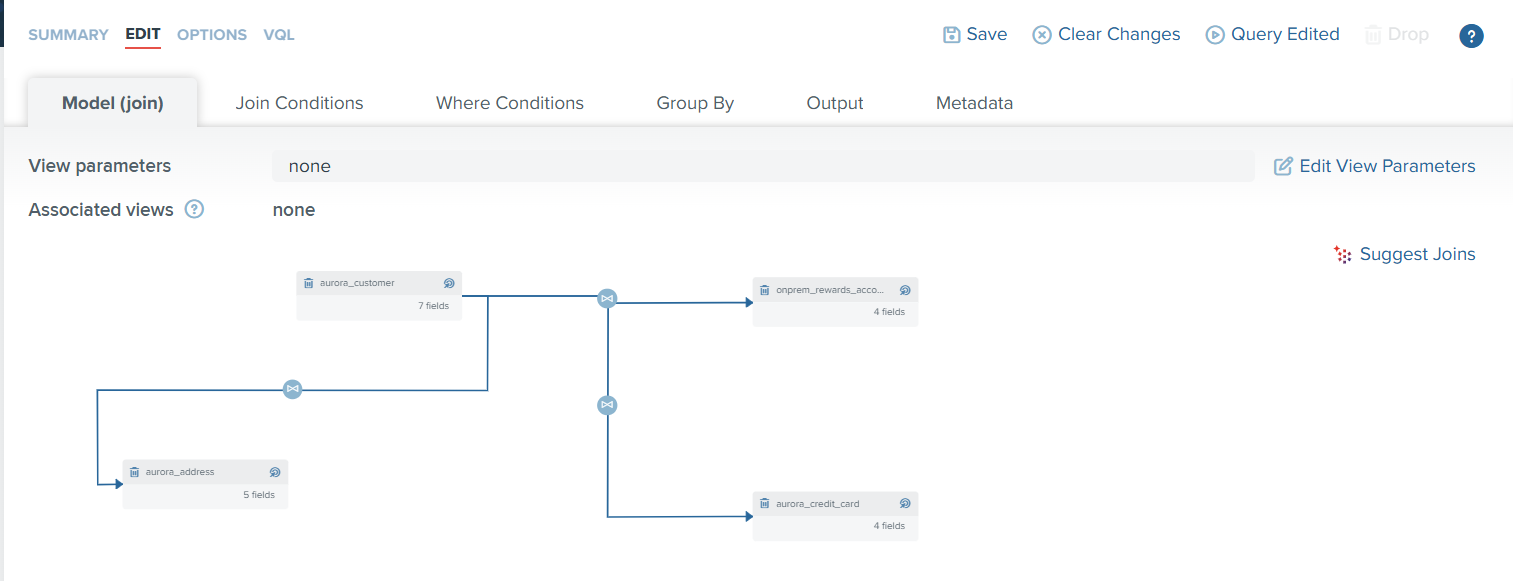
Figure 2: The customer_360 derived view in Denodo Design Studio. Four base views appear on the canvas across the three sources, joined on cid and location. The ssn column on aurora_customer and the card_num column on aurora_credit_card carry the pii_sensitive tag referenced by the Global Security Policy in the Governed access section
Metric view: Lifetime customer value
Metric views define reusable business measures with a specific SOURCES/DIMENSIONS/METRICS structure. See the Defining a Metric View reference in the VQL guide for the full syntax. lifetime_customer_value doesn’t live inside customer_360. It lives beside it, as its own object:
CREATE OR REPLACE METRIC VIEW lifetime_customer_value
(
first_name, last_name, state, rewards_since, lifetime_spend, order_count, product_id,product_name, product_brand,product_dept, units_sold
)
SOURCES (
customer_360 AS customer_360,
redshift_order AS redshift_order,
redshift_product AS redshift_product
)
ASSOCIATIONS (
customer_360 redshift_order assoc_customer360_orders,
redshift_product redshift_order assoc_product_orders
)
DIMENSIONS (
customer_360(
first_name AS customer_360.first_name,
last_name AS customer_360.last_name,
state AS customer_360.state,
rewards_since AS customer_360.rewards_since
),
product(
product_id AS redshift_product.id,
product_name AS redshift_product.name,
product_brand AS redshift_product.brand,
product_dept AS redshift_product.dept
)
)
METRICS (
lifetime_spend AS sum((redshift_order.price*redshift_order.quantity)),
order_count AS count(redshift_order.id),
units_sold AS sum(redshift_order.quantity)
);
Other views and external reporting tools can reference lifetime_customer_value the same way it references other views. When a business rule changes (say, lifetime_spend should exclude canceled orders), the update happens once in the metric definition. Every consumer picks up the change at the next query, without touching the derived view or the downstream application. Different teams can stand up their own derived views to convey the way their line of business sees the world. The base data stays shared while the semantic interpretation stays independent, so neither team’s edits disturb the other.
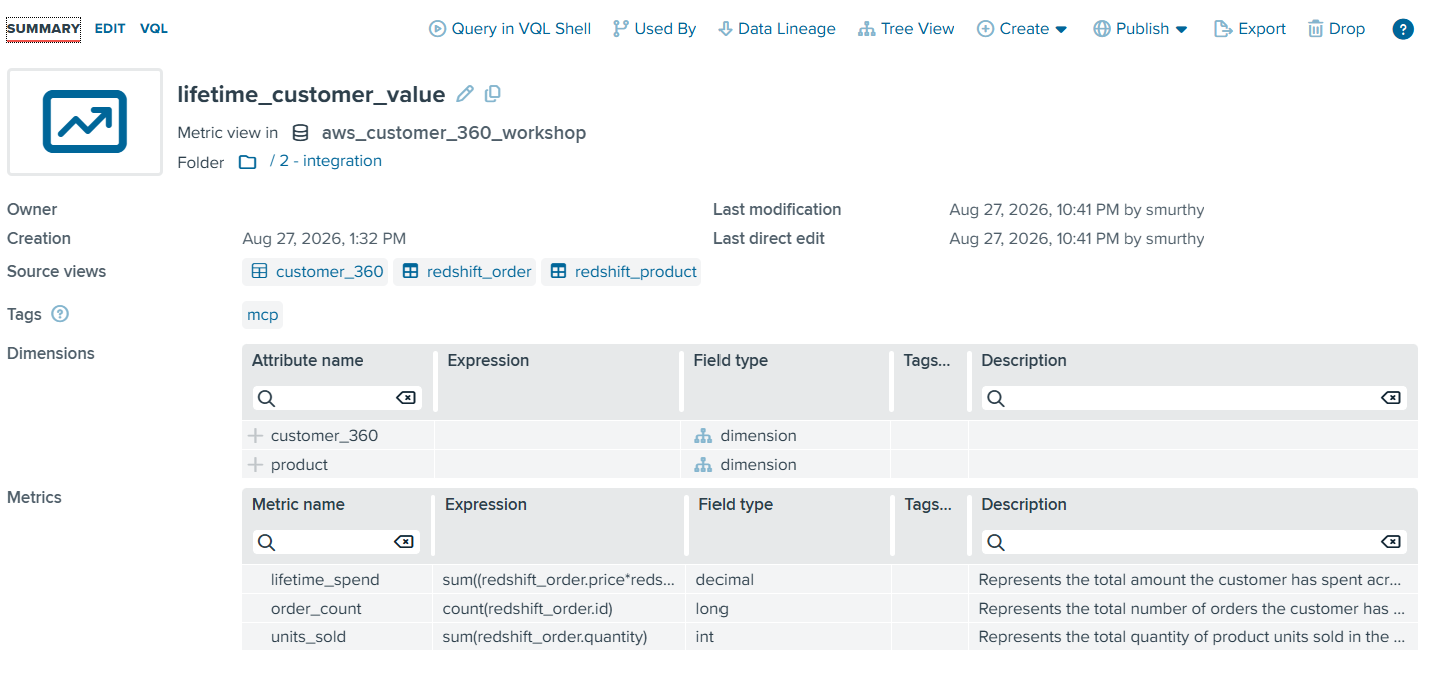
Figure 3: The lifetime_customer_value metric view in Design Studio, showing the SOURCES, DIMENSIONS, and METRICS panels that define lifetime_spend, order_count, and units_sold
How VDP executes the federated query
When the agent runs the auto-enrollment question from The example (“Which of our top 20 customers by lifetime spend haven’t enrolled in the rewards program yet?”), the corresponding VQL uses the metric view to compute the result set and evaluate the desired metric:
SELECT first_name, last_name, state, EVALUATE_METRIC(lifetime_spend) AS lifetime_spend
FROM lifetime_customer_value
WHERE rewards_since IS NULL
GROUP BY first_name, last_name, state
ORDER BY EVALUATE_METRIC(lifetime_spend) DESC
LIMIT 20;
Although this query only references the metric view, VDP’s cost-based optimizer plans the federated execution across the three engines where the corresponding data is originating. The resulting plan looks approximately like this:
- Push down to Amazon Aurora: Denodo pushes a join of customer, address, and
credit_cardto Aurora, returning customer profile fields includingfirst_name,last_name, state, andcid. - Push down to on-premises PostgreSQL: Denodo pushes a projection of
rewards_accountreturningcidandcreate_date. - Push down to Amazon Redshift: Denodo pushes the spend aggregation to Amazon Redshift as
SUM(price * quantity)grouped bycid. - Combine inside Denodo: Denodo left-joins the Aurora profile result with the PostgreSQL rewards result on
cid, then right-outer-joins that result with the Amazon Redshift aggregated spend oncid. Denodo filters rows whererewards_sinceIS NULL, evaluates the metric as the outer grouped aggregation (sum(sum) AS lifetime_spend) grouped byfirst_name,last_name, and state, orders bylifetime_spenddescending, and returns up to 20 rows.
The plan reflects the strengths of each source. Amazon Redshift does the aggregation, Aurora does the customer-profile join because all three profile tables live there, and the on-premises cluster returns a small set of rewards records. VDP handles the final cross-engine join and the top-N filter, working with three compact intermediate result sets that carry one row per customer rather than one row per order. A hand-written pipeline usually approximates this same shape and then must keep it in sync forever.
VDP also handles type reconciliation where it’s cheapest. If the same identifier is stored as an integer in one source and a string in another, VDP pushes the cast into the source that can still filter on the resulting predicate, rather than pulling data across engines and reconciling types afterward.
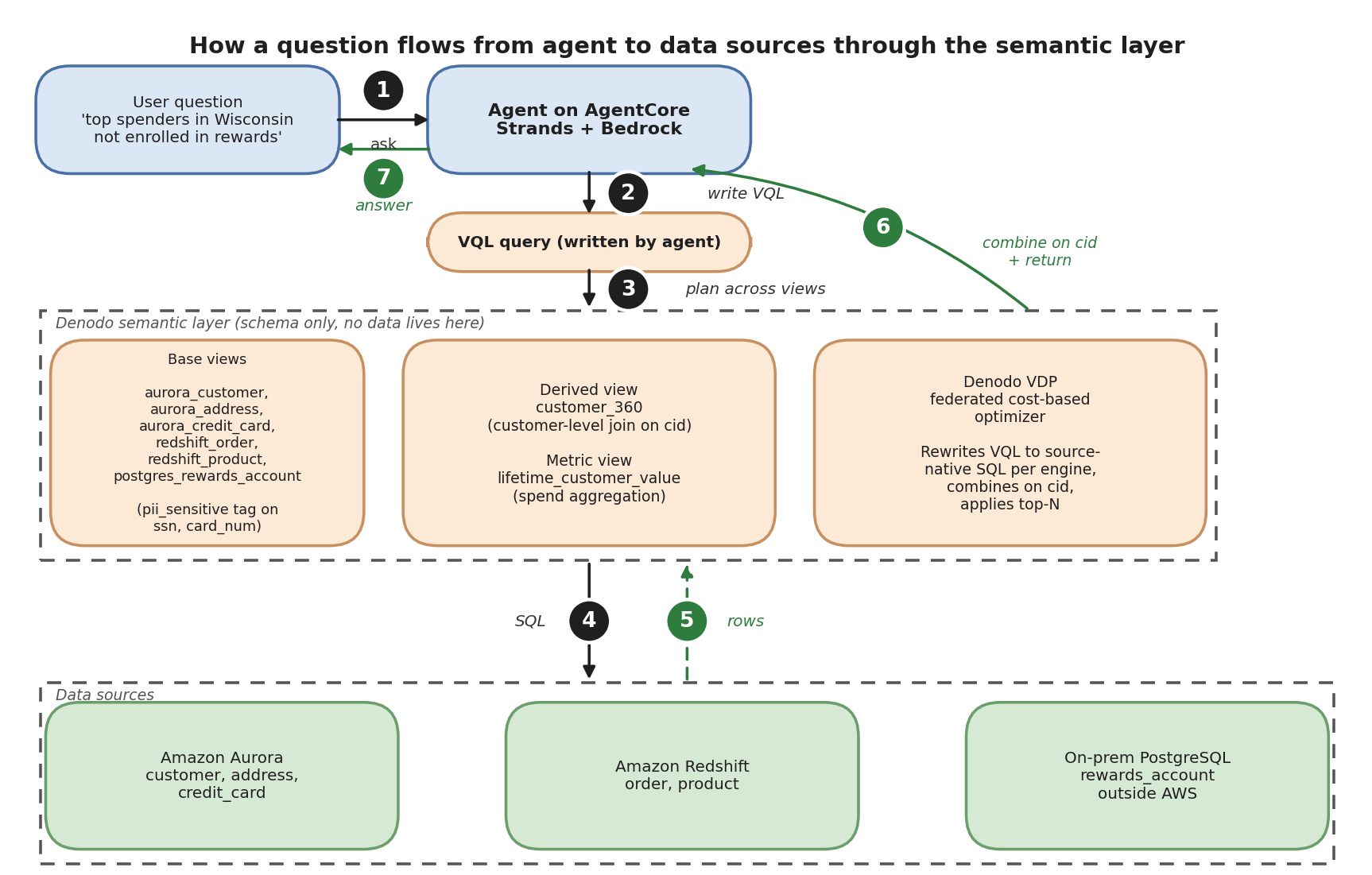
Figure 4: The query flow from the C360 agent to Amazon Aurora, Amazon Redshift, and on-premises PostgreSQL and back. VDP rewrites one VQL request against customer_360 joined with lifetime_customer_value into source-native SQL per engine, collects the intermediate result sets, and joins them on cid inside VDP before returning the final rows to the agent
Beyond query push-down and on-demand federation, VDP also offers caching, aggregate-aware acceleration, and point-to-point replication. These techniques complement push-down capabilities in use cases where pre-calculating complex transformations may be necessary, while preserving access control rules and data lineage.
Publish for discovery
A semantic view that only exists as a queryable endpoint leaves a discoverability gap. The next team that needs a “customer lifetime value” measure has no way to know lifetime_customer_value already exists, what it’s built on, or who else depends on it. Publishing customer_360 and lifetime_customer_value to the Denodo Data Marketplace turns them into reusable, governed enterprise data products and closes that gap: both objects appear with their VQL definitions, ownership, business descriptions, custom properties, and lineage back to the base views. Consumers search by business meaning rather than by knowing the schema. The Denodo Data Marketplace also provides other features focused on self-service for non-technical users, including data preparation wizards, endorsements and deprecations notes from the administrators, and the capability to make requests and ask questions to data product owners.
Denodo extends this with the 360 graph, a relationship view around a business concept. This graph attaches the reports, dashboards, notebooks, or agent tools that already use customer_360, along with glossaries that define the meaning of the data in the table or conditions of use, for instance. Consumers can inspect the surrounding context of the dataset before writing a query.
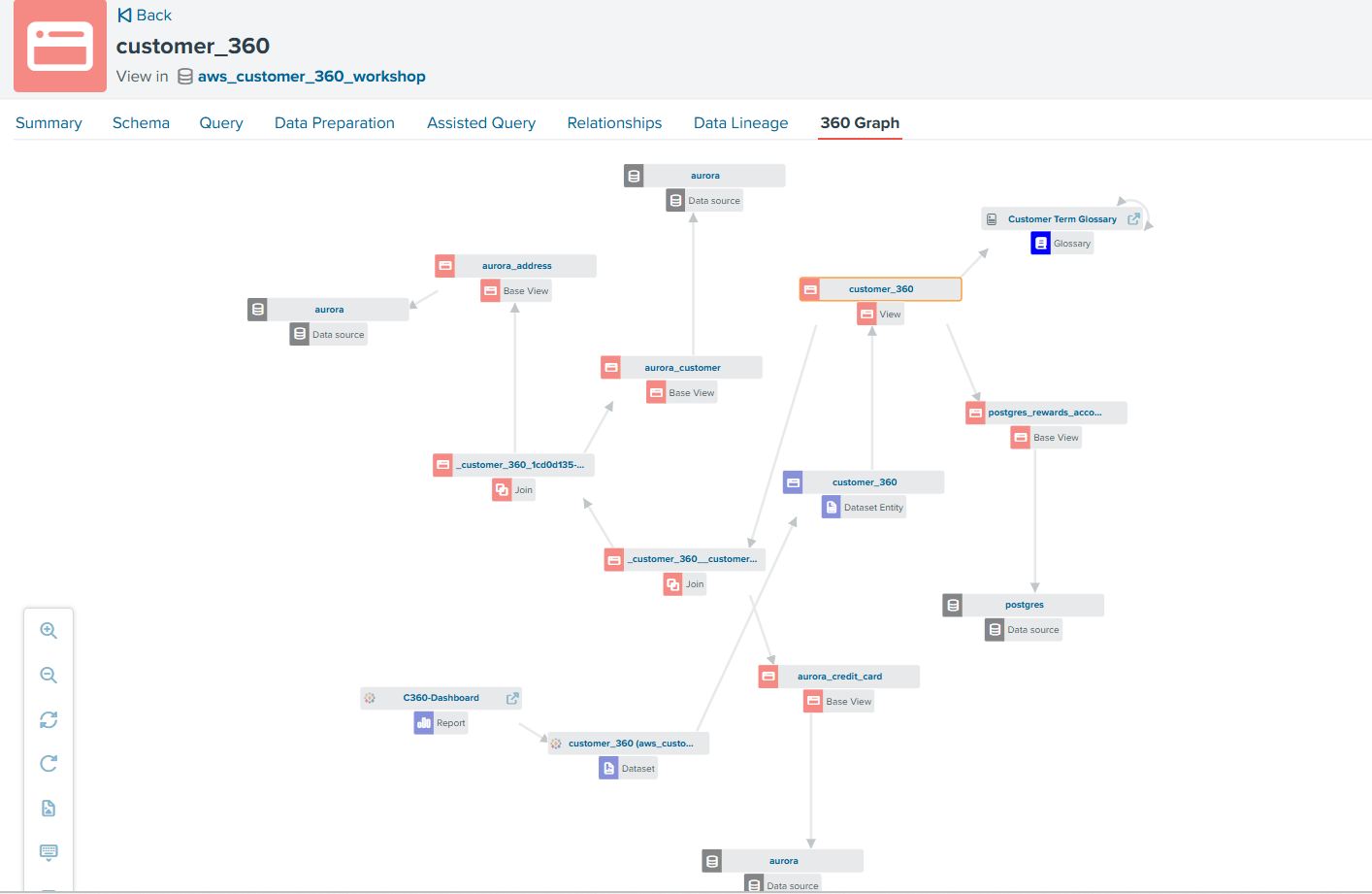
Figure 5: customer_360 graph view listing in the Denodo Data Marketplace. The detail panel shows a BI tool in Tableau consuming the view and the glossary definition linked to the view
A note on interoperability
The semantic model in Denodo is defined in VQL, but Denodo natively exposes any view over multiple open protocols. The same customer_360 view can be reached as SQL through JDBC, ODBC, or ADBC, as GraphQL through the Denodo GraphQL Service, as OData 2.0 or 4.0 through the Denodo OData Service, or as MCP tools through the Denodo MCP Server. Choosing MCP for this walkthrough is a fit for AgentCore. The same view is available to a Power BI dashboard, a Tableau workbook, or a Java application without additional modeling.
Denodo also joined Apache Ossie (incubating), formerly Open Semantic Interchange (OSI), in March 2026, a vendor-neutral open-source specification for semantic metadata. Apache Ossie is at an early stage, but the intent is portability of semantic definitions across applications that adopt it. That said, Denodo already offers integration through Denodo Connects to share metadata with other data catalogs such as SageMaker Catalog, Collibra, Purview, and others.
Governed access: Identity propagation and runtime enforcement
Broad reach across data sources is one of the core characteristics of an enterprise-wide semantic layer, but that same reach creates a real risk when runtime access control is missing. If per-user filtering lives in the agent’s code, it’s one prompt injection away from being bypassed. If it lives in the LLM, it doesn’t really live anywhere. If it is enforced only in individual source systems, policies can be inconsistent and may not account for business meaning created across sources. Aurora doesn’t know what “top spender” means in the semantic layer, and neither does an on-premises PostgreSQL cluster behind a bastion host. And very often, especially in hybrid scenarios that blend on-premises and cloud systems, Identity Providers across all of them are not even an option.
The approach in this architecture is to enforce access at the semantic layer, using the identity of the human user who initiated the request, propagated end-to-end from the IdP through Amazon Bedrock AgentCore to Denodo Virtual DataPort.
The identity propagation chain
Figure 6 zooms into the identity portion of the reference architecture in Figure 1, expanding the outbound path from the app to Denodo VDP into an eight-hop sequence. The following numbered steps correspond one-to-one to the numbered arrows in the figure.
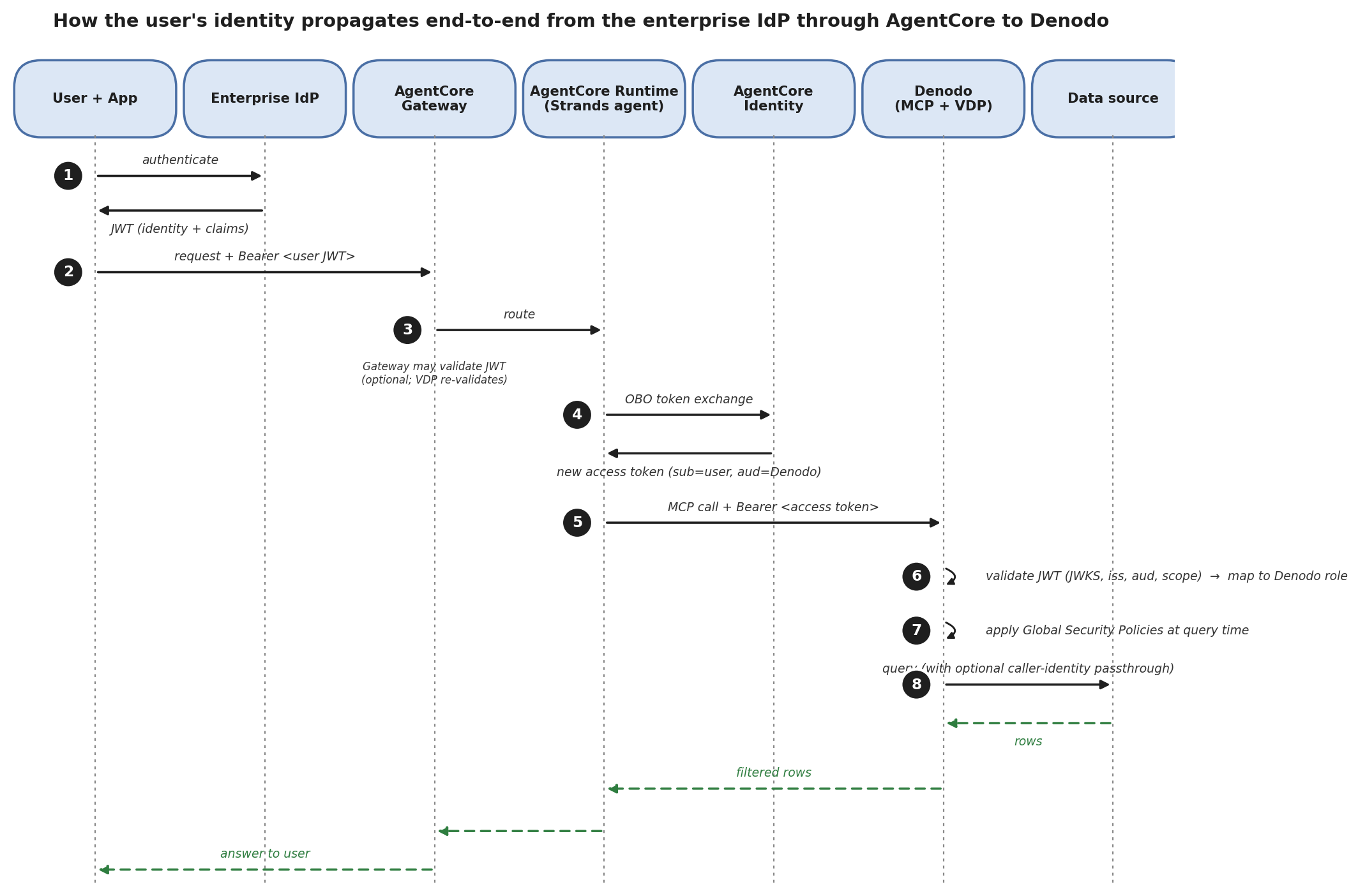
Figure 6: Identity propagation and query flow from the user’s login through Amazon Bedrock AgentCore to Denodo (MCP Server and VDP) and the underlying data sources. Black arrows show the outbound identity and query path. Green dashed arrows show the return path with the filtered result set
- The user authenticates to the app against the enterprise IdP. The IdP returns a JWT carrying the user’s identity and attribute claims — role, region, department, and whatever else the IdP is configured to emit.
- The app calls the agent through AgentCore Gateway with the user’s JWT as the bearer token.
- Gateway routes the request to AgentCore runtime, which hosts the Strands agent process.
- When the agent invokes an outbound tool call, AgentCore Identity performs an On-Behalf-Of token exchange and returns a new access token whose sub claim is the human user and whose aud claim is Denodo.
- The agent presents the new access token to the Denodo MCP Server as
Authorization: Bearer <access_token>on the MCP request. - Denodo VDP validates the JWT against the configured JWKS URL, checks the issuer and audience, extracts the scope claim, and maps the caller to a Denodo role.
- VDP evaluates Global Security Policies at query time and returns a filtered result set to the agent.
- VDP queries the data sources to satisfy the request and combines the results before returning them.
Gateway JWT validation at step 2 is optional because VDP re-validates the token in step 6. With Gateway validation on, malformed tokens fail earlier in the request path.
The token exchange at step 4 uses either the RFC 8693 token-exchange grant or the RFC 7523 JWT-bearer grant, based on the credential provider configuration. The credential itself does not enter agent code. AgentCore Identity injects it at call time.
The caller-identity passthrough option at step 8 is enabled per data source and requires Denodo and the source to share the same IdP. When it applies, the caller’s identity is forwarded end-to-end, giving full auditing at the source.
Applying access policies in Denodo
Customer 360 data is regulated. For example, some users (HR, fraud analysts) may need to see PII like a Social Security number (SSN) and full credit card number. But most users (marketing, analytics) must not.
Denodo’s mechanism for this is Global Security Policies with attribute- and role-based access control. A Global Security Policy is a rule that applies to views or columns carrying a specific tag, evaluated against the caller’s role and session attributes at query time. The underlying view is not restructured.
To illustrate this, we’ve tagged two columns (ssn and card_num) as PII on the base views over Aurora. We create a Global Security Policy mask_pii_columns.
- Audience: The caller’s role is not
hr_user. - Elements: Applies to columns with the
pii_sensitivetag. - Action: Mask with asterisks (
****).
We then define two Denodo roles.
hr_user: Has Execute oncustomer_360. Sees every column.marketing_user: Has Execute oncustomer_360. Will seessnandcard_numas****because the policy applies.
When marketing_user runs the VQL query:
SELECT cid, first_name, last_name, state, ssn
FROM customer_360
WHERE state = 'WI';
VDP evaluates the Global Security Policy before planning the query. It sees that ssn carries the pii_sensitive tag and the caller’s role is not hr_user, so it rewrites the projection to return *** for ssn.
For row-level filtering (a US-East analyst who should only see east-coast customers, for example) the same mechanism scales. The policy condition can even depend on session attributes mapped from the JWT token, or pulled dynamically from an external table.
A note on Responsible AI
Denodo’s Global Security Policies filter PII at the semantic layer, so the model never sees ssn or card_num for callers who shouldn’t. Even then, agent responses can echo customer identifiers, locations, or spending patterns in natural language. Treat agent outputs with the same handling and retention policy you apply to the underlying regulated data: scope logging and transcript storage, apply Amazon Bedrock Guardrails for content and sensitive-topic controls, and limit who can read the responses. For broader guidance, see Responsible AI in Amazon Bedrock.
Audit and observability across layers
Each layer of the request path logs independently. AgentCore runtime emits invocation records to Amazon CloudWatch. AgentCore Gateway logs inbound MCP requests, including the caller’s JWT sub claim. The Denodo MCP Server records tool calls to its own log. Denodo VDP’s audit log captures the full VQL request, the mapped Denodo role, the resolved federated plan, and policy evaluation outcomes.
These logs can also be incorporated into Amazon CloudWatch. When per-source audit tied to the human user is required (for HIPAA or SOX compliance, for example), configure pass-through session credentials on the base views for those sources so Denodo forwards the caller’s identity to the source system where the source supports it, instead of relying on service accounts.
Expose the layer through the Denodo MCP Server
The Denodo MCP Server is an add-on component that sits between MCP clients and VDP: download the distribution, extract it, edit config/application.properties, and start it. The server listens for streamable HTTP MCP requests at http://<mcp-host>:8080/<database>/mcp and forwards them to VDP over JDBC.
Three configuration values matter for this walkthrough.
mcp.security.oauth2.enabled=true: accepts OAuth 2.0 bearer tokens on inbound MCP requests. Paired with VDP’s OAuth authenticator configuration, the token forwards to VDP for validation and role resolution (see also the Governed access section).vdp.datasource.jdbcUrl=jdbc:vdb://<vdp-host>:9999/: the JDBC URL where VDP is reached. The specific database targeted per request comes from the MCP endpoint path.mcp.visibility.tags=mcpcontrols which views are visible from the MCP Server. If defined, only views tagged with at least one of these tags will be visible.
The server implements the MCP OAuth 2.0 authorization flow, including RFC 9728 Protected Resource Metadata and RFC 7591 Dynamic Client Registration.
A note on IdP compatibility
The Denodo MCP Server documents support for the automatic Dynamic Client Registration flow with Okta, Ping Identity, and Keycloak. For other identity providers, the MCP Server also accepts manual client configuration where the OAuth token is obtained out of band and forwarded as a static Authorization header on the MCP request, as described in the Denodo MCP Server User Manual.
Front the server with an Application Load Balancer
If the Denodo MCP Server runs on Amazon EC2 or Amazon EKS in the same VPC as VDP, expose it through an Application Load Balancer with an HTTPS listener and a certificate from AWS Certificate Manager. This gives AgentCore Gateway a stable HTTPS endpoint and offloads TLS termination from the MCP Server process. Target group: HTTP, port 8080. The health check path should accept both 200 and 404 as healthy responses, since the root path returns 404 and /health returns 200 when the server is up and connected to VDP.
Register as an AgentCore Gateway target
The full step-by-step walkthrough, including AgentCore Gateway creation, IAM service role configuration, and Gateway target validation, is in Denodo’s Integrating Amazon Bedrock AgentCore with Denodo via MCP Server integration guide.
Add Denodo VQL skill in the harness
The Denodo VQL skill acts as a system prompt extension for the LLM within the agent framework (such as Strands or Bedrock AgentCore). When registered in the agent harness, it instructs the model on VQL syntax rules and how to help prevent SQL errors.
Deploy and run the agent
The Denodo AgentCore documentation reference has the full agent code in the Denodo KB. The pattern is short: a foundation model on Amazon Bedrock, an MCP client pointed at the Denodo MCP Server, and an AgentCore runtime entrypoint that wires them together.
Verification
To confirm the semantic layer, the agent, and the identity flow work as intended, we run three query categories through the agent, plus one governance rerun that demonstrates the same-query-two-users property from the Governed access section. We can use Denodo’s Data Marketplace assistant, which relies on equivalent tools behind the scenes, to get a quick validation on our scenario.
Query 1, Aurora-only
“List our customers in Wisconsin, with their city.”
The agent generates and runs:
/* The query needs to retrieve first_name, last_name, and city from the customer_360 view where state = 'WI', ordered by last_name. The output will be multiple rows with 3 columns. The table is at customer granularity (one row per customer). No obligatory columns are present, so a simple WHERE filter on state suffices. */
SELECT "first_name",
"last_name",
"city"
FROM "customer_360"."customer_360"
WHERE "state" = 'WI'
ORDER BY "last_name"
VDP’s optimizer determines that only Aurora-side data is needed for the projection and filter, and pushes a single query down to Amazon Aurora. Based on a probe query, the agent can translate the filter from Wisconsin to the predicate state = 'WI'. Amazon Redshift and the on-premises cluster are not touched.
Query 2, Redshift-only
“What are our top 10 products by units sold?”
The agent generates:
/* The user wants top 10 products by total units sold from a metric view. I need to use EVALUATE_METRIC for units_sold, GROUP BY product_name, ORDER BY the metric descending, LIMIT 10. The output will be multiple rows (up to 10) with two columns: product_name and total_units_sold. */
SELECT "product_name",
EVALUATE_METRIC("units_sold") AS "total_units_sold"
FROM "customer_360"."lifetime_customer_value"
GROUP BY "product_name"
ORDER BY "total_units_sold" DESC
LIMIT 10
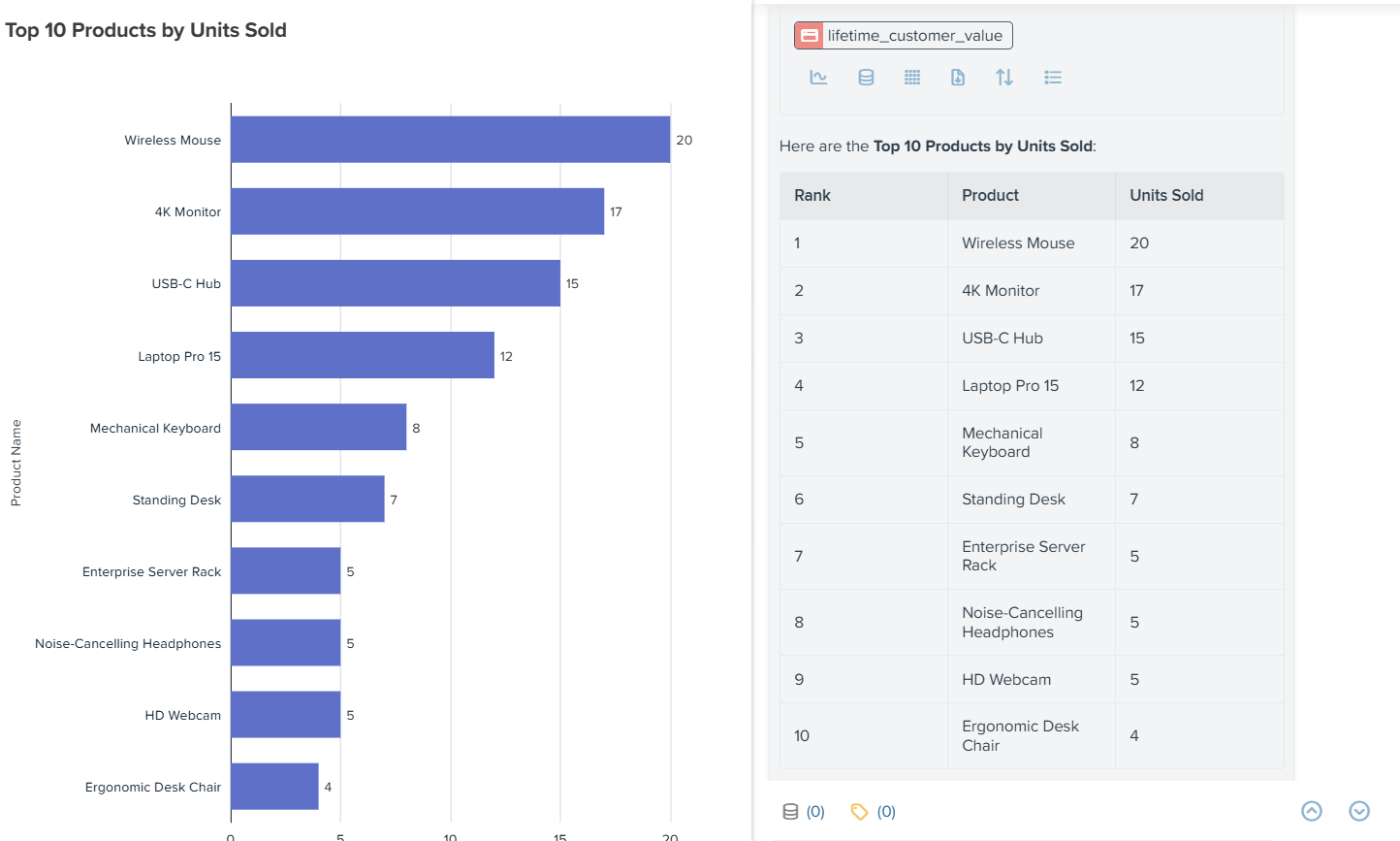
Figure 7: VDP pushes the entire query (join, aggregation, ordering, and limit) to Amazon Redshift because both the product and order data live there. Aurora and the on-premises cluster are not touched
Query 3, three-way federation
“Which of our top 20 customers by lifetime value haven’t enrolled in the rewards program yet?”
The agent generates:
/* This is a metric view, so I need to use EVALUATE_METRIC for lifetime_spend and order_count. The query needs to: 1. Aggregate by first_name, last_name, state, rewards_since to get total lifetime_spend and order_count 2. Rank top 20 by total lifetime_spend 3. Filter those top 20 where rewards_since IS NULL I'll use a CTE with ROW_NUMBER() to get top 20, then filter for NULL rewards_since in outer query. */
WITH "ranked_customers" AS (
SELECT "first_name",
"last_name",
"state",
"rewards_since",
EVALUATE_METRIC("lifetime_spend") AS "total_lifetime_spend",
EVALUATE_METRIC("order_count") AS "total_order_count"
FROM "customer_360"."lifetime_customer_value"
GROUP BY "first_name",
"last_name",
"state",
"rewards_since"
ORDER BY "total_lifetime_spend" DESC
LIMIT 20
)
SELECT "first_name",
"last_name",
"state",
"rewards_since",
"total_lifetime_spend",
"total_order_count"
FROM "ranked_customers"
WHERE "rewards_since" IS NULL
ORDER BY "total_lifetime_spend" DESC
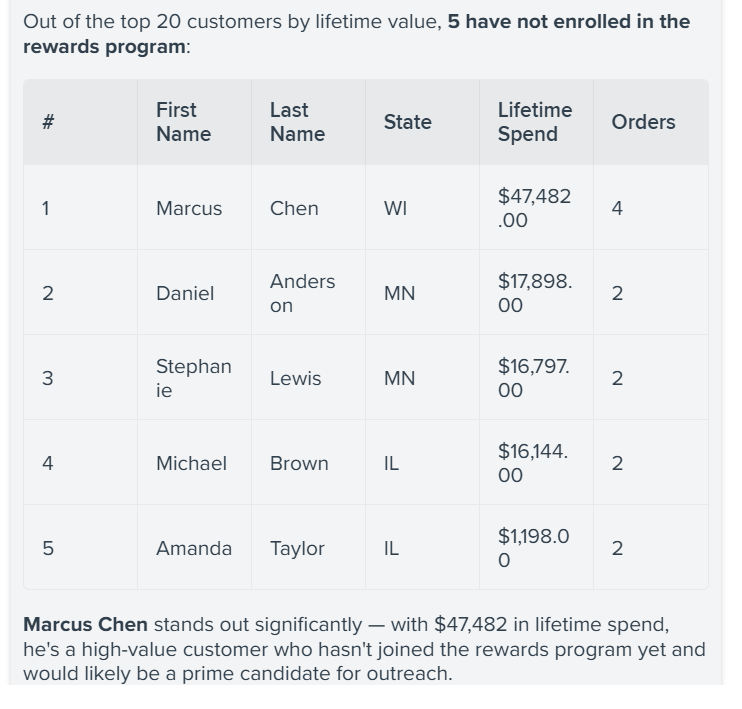
Figure 8: Agent result for the three-way federated query, listing the top customers by lifetime value who have not enrolled in the rewards program
VDP plans across the three engines as described in the Build the semantic layer section: profile from Aurora, aggregated spend from Amazon Redshift, enrollment records from the on-premises cluster, and the final join and top-N inside VDP. The top result in the POC data was Marcus Chen from Milwaukee, WI, with $47,832 in lifetime spend, a customer with high spend and no rewards enrollment, exactly the auto-enrollment target from the example question in The example. Note that the LLM didn’t need to come up with the definition of lifetime_spend, since the formula is part of the semantic model as defined in the metric view.
Governance rerun
We run Query 1 with ssn added to the projection, as two different callers:
SELECT cid, first_name, last_name, state, ssn
FROM customer_360
WHERE state = 'WI';
As hr_user, the result includes the ssn values. As marketing_user, the result returns the same rows with ssn with asterisks as a masked value. No changes to the query text, the agent code, the MCP Server, VDP, or Aurora between the two runs. The Global Security Policy mask_pii_columns from the Governed access section evaluates against the caller’s role at query time, and VDP rewrites the projection accordingly. The same behavior applies to card_num.
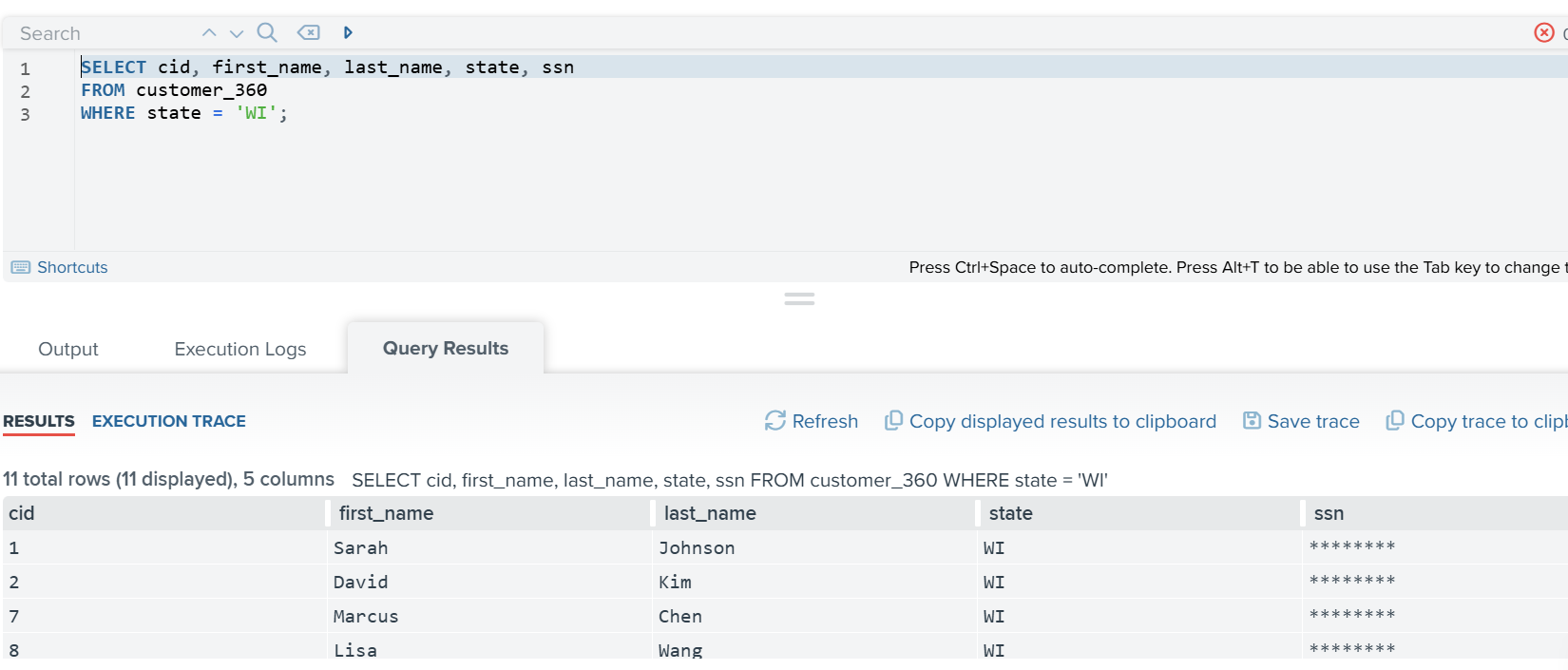
Figure 9: The governance rerun of the same query, with ssn returned in full for hr_user and masked for marketing_user
Extending to other sources
Adding a source outside AWS to customer_360, whether that’s Salesforce for CRM records, ServiceNow for customer service data, or SAP for ERP tables, is the same modeling exercise as Aurora, Amazon Redshift, and the on-premises cluster. Create a base view, join it into the derived view on cid, and tag sensitive columns. The metric views, the Global Security Policy, and the agent’s VQL don’t change. What changes is the wrapper VDP uses to reach the source. For example:
- Salesforce connects through the Denodo Salesforce connector with OAuth 2.0 authentication and
VQL-to-SOQLtranslation over the REST or Bulk API. - ServiceNow, Microsoft Dynamics 365, and other SaaS tools use Denodo’s SaaS wizard templates, pre-configured for common APIs.
- SAP ERP connects through BAPI sources using the SAP Java Connector. VDP calls SAP RFCs and shapes the response into rows.
The agent doesn’t know which of these sits underneath. It queries customer_360 in VQL. Denodo’s wrapper handles the source-native translation, and Denodo’s Global Security Policy applies uniformly whether the row comes from a JDBC engine, a REST API, or an RFC call.
One deployment-time decision varies by source: whether to pass the caller’s identity through to the source or connect as a service account. Pass-through gives end-to-end audit at the source when the source supports it (Kerberos to SAP or OAuth to Salesforce, for example). Service-account connections are simpler, and the source’s audit shows the query as coming from Denodo.
Deployment: Denodo Agora versus self-managed
Denodo on AWS runs in one of two shapes. Both use the same Virtual DataPort, same VQL, same Global Security Policies, same MCP Server. The choice is operational.
Agora: Fully managed
Denodo Agora is Denodo’s fully managed cloud service, available on the AWS Marketplace. Agora runs on a split-plane architecture. The Control Plane (Solution Manager, Design Studio, Scheduler admin, Monitoring/Diagnostics) runs in Denodo’s cloud accounts, and the Execution Plane (VDP, Scheduler, Data Catalog) runs inside the customer’s AWS account. The compute that touches the data lives in the customer’s VPC. The management surface is operated by Denodo.
Choose Agora when you don’t want to operate the application and the update cadence Denodo publishes works for your organization.
Self-managed on Amazon EC2 or Amazon EKS
Self-managed deployments install Denodo Platform entirely in the customer’s AWS account. Denodo publishes VM images on AWS Marketplace and ships container images with Helm charts for Amazon EKS. You handle the cluster, upgrades, and backups.
Choose self-managed when compliance requires a specific deployment posture, when you want to control the version cadence, or when the reference architecture calls for a Denodo cluster inside a specific VPC.
Reaching sources outside AWS
Both deployment shapes place VDP in the customer’s AWS account. Reaching an on-premises source is the same problem in both cases: a network path from the VPC that hosts VDP to the on-premises cluster, provisioned through whichever hybrid connectivity option the organization already uses. For SaaS sources like Salesforce or ServiceNow, no additional setup is needed, since the Execution Plane has outbound internet access by default, which is sufficient for OAuth 2.0 authentication and REST API calls.
Conclusion and where to start
Reliable agentic access to enterprise data needs three things working together: a foundation model that can plan and generate queries, a semantic layer that presents business-meaningful data over live source systems, and a runtime that hosts the agent and manages the identity flow. Amazon Bedrock, Denodo Platform, and Amazon Bedrock AgentCore each play one of those roles.
The agent talks to the semantic layer, not directly to the underlying databases. Base views, derived views, metric views, tags, and Global Security Policies live in VDP. When a source schema drifts, when a new source comes online, or when a governance rule changes, the update happens in the semantic layer and every consumer picks it up at the next query. The additional metadata the semantic layer carries (documentation, descriptions, metric formulas, and the 360 graph) gives the model more grounded business context to reason over, rather than raw schema alone.
Where to start
Try Agora on AWS and follow the instructions to deploy. Agora is Denodo’s fully managed cloud service for deploying an AI data layer on AWS, providing live, governed access to distributed enterprise data.
Most teams get this working by starting narrow and expanding.
- Pick one agentic workflow that spans two or three distinct source systems that takes longer than it should to answer today.
- Write three to five specific questions the workflow needs to answer. These are the queries the semantic layer must support on day one.
- Connect data sources and create base views over the source tables the workflow touches. Tag PII columns during creation.
- Build the derived views and metric views the questions require.
- Implement Global Security Policy to help protect PII, protected health information (PHI), payment card industry (PCI), or other sensitive information.
- Register the Denodo MCP Server as an AgentCore Gateway target and wire a Strands agent to it using the pattern in the earlier section. Deploy with
agentcore deploy.
Further reading
- Integrating Amazon Bedrock AgentCore with Denodo via MCP Server: Denodo Community reference implementation.
- Denodo MCP Server User Manual.
- Denodo VQL Guide, including Defining a Metric View.
- Denodo Global Security Policies.
- Amazon Bedrock AgentCore developer guide.
About the authors

Suntosh Murthy
Suntosh is a Partner Solutions Architect at Denodo, where he collaborates with strategic partners to design and implement cloud data architecture, semantic layer solutions, and enterprise reference architectures that help customers make data-driven decisions.

Pablo Alvarez-Yañez
Pablo is the Global VP of Product Management at Denodo, where he defines the offering strategy, sets direction and priorities for the product portfolio, and translates customer needs into requirements. He is responsible for formulating the product strategy, gathering customer feedback, and coordinating with engineering, marketing, and sales to execute on that strategy. His current priorities revolve around cloud deployments, big data, and data science.

JP Boreddy
JP is a Senior Solutions Architect at AWS, where he partners with enterprise customers on cloud architecture, data, and AI workloads.

Sahil Thapar
Sahil is a Principal Solutions Architect at AWS, where he works with ISV customers to build highly available, scalable, and resilient applications on the AWS Cloud. He specializes in containers, machine learning, and generative AI, helping enterprises architect production-grade solutions.
来源:AWS Machine Learning Blog · aws.amazon.com